
从HTML网页或者markdown文章粘贴进WordPress编辑器时总会产生些code代码,部分内容是HTML代码或者文字也会被加进去,每次清理非常麻烦,本次以就以本站WordPress编辑器增加个清理 code 标签”功能分享给大家代码,只需要复制粘贴即可使用。
- 在编辑器工具栏增加按钮:清理代码标签
- 点击后会:
- 删除 和
- 删除 和
- 把 <code…> 这种转义形式也清掉(可选)
- 仅影响当前编辑器内容,不改其他页面
一键清除效果如下:
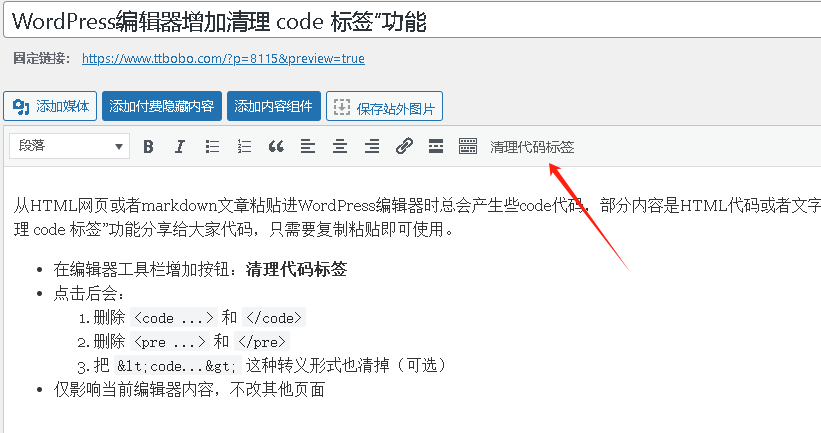
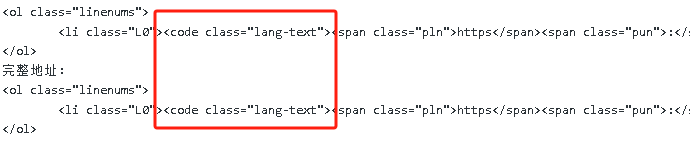
加到 functions.php 的代码
你的主题目录/wp-content/themes
放在文件末尾 ?> 前(如果没有 ?> 就直接加最后)
/**
 * 经典编辑器增加“清理代码标签”按钮
 */
add_filter('mce_external_plugins', function($plugins){
    $plugins['clear_code_wrapper'] = get_stylesheet_directory_uri() . '/assets/js/tinymce-clear-code.js';
    return $plugins;
});

add_filter('mce_buttons', function($buttons){
    $buttons[] = 'clear_code_wrapper';
    return $buttons;
});
同时新建 JS 文件
路径(按上面代码): /wp-content/themes/你的当前主题或子主题/assets/js/tinymce-clear-code.js
(function() {
tinymce.PluginManager.add('clear_code_wrapper', function(editor) {
editor.addButton('clear_code_wrapper', {
text: '清理代码标签',
tooltip: '移除 code/pre 包裹,防止样式污染',
icon: false,
onclick: function() {
var html = editor.getContent({ format: 'html' });
html = html.replace(/<\s*code\b[^>]*>/gi, '');
html = html.replace(/<\s*\/\s*code\s*>/gi, '');
html = html.replace(/<\s*pre\b[^>]*>/gi, '');
html = html.replace(/<\s*\/\s*pre\s*>/gi, '');
html = html.replace(/<\s*code\b[^&]*>/gi, '');
html = html.replace(/<\s*\/\s*code\s*>/gi, '');
html = html.replace(/<\s*pre\b[^&]*>/gi, '');
html = html.replace(/<\s*\/\s*pre\s*>/gi, '');
editor.setContent(html, { format: 'html' });
editor.notificationManager.open({
text: '已清理 code/pre 标签',
type: 'success',
timeout: 1500
});
}
});
});
})();
服务声明: 本网站除正版商用版块可商用外,其他所有发布的源码、软件和资料均为作者提供或网友推荐收集各大资源网站整理而来,仅供功能验证和学习研究使用,您必须在下载后24小时内删除。不得使用于非法商业用途,不得违反国家法律,否则后果自负!一切关于该资源商业行为与本站无关。如果您喜欢该程序,请支持购买正版源码,得到更好的正版服务。如有侵犯你的版权合法权益,请邮件或QQ:3089659733与我们联系处理删除(邮箱:ynzsy@qq.com),本站将立即更正。
评论(0)